BACnet Integration
BACnet is a building automation protocol that is used for control systems dealing with heating, ventilating, cooling, lighting control, fire alarming, fire suppression, and access control. CenterScape can publish sensor information via the BACnet protocol so that these automation systems are able to leverage sensor data from RF Code's suite of sensors as part of a monitoring and control strategy of equipment managed by building automation systems or any other software that support BACnet. Unlike many traditional BACnet devices, CenterScape has a wide variety and number of sensors that each instance may contain, so the approach to BACnet addressing is dynamic but stable. CenterScape uses a filter to determine which sensors and which on attributes (Temperature, Humidity, Dry contact, etc) to publish on BACnet and assigns BACnet addressing to the matching sensors. This mapping is then used to configure points on building automation systems.
powermatic
BACnet Requirements
BACnet is not a very modern protocol in that it is not easily routable across different subnets. The original design of the BACnet protocol was for discrete systems within a single building or small campus. BACnet supports Ethernet, BACnet/IP, RS-232 and older communication methods no longer in wide use. CenterScape supports only BACnet/IP, which is the most widely used communication method used by BACnet today. However, BACnet/IP utilizes UDP and both unicast and broadcast packets used in the discovery of BACnet devices on a network. Those packets are limited to the local subnet and are not routable unless using a BACnet Broadcast Management Device (BBMD). A BBMD listens for BACnet broadcasts in one subnet and forwards those broadcasts to another BBMD on another subnet for rebroadcast. Without BBMDs the CenterScape BACnet interface as well as any other BACnet device is limited to communication of those broadcast packets to the local subnet that they are attached to.
The following is a list of requirements prior to enabling BACnet on CenterScape
- Port 47808 must allow inbound and outbound UDP traffic
- The application that is connecting to CenterScape must be on the same subnet or BBMD must be configured to pass traffic between networks.
Configuring BACnet
The steps for Configuration BACnet on CenterScape is to meet the BACnet Requirements in the section above, then configure global settings, then create a lists of sensor points to publish, then use the addresses provided to configure the BACnet consuming software.
BACnet "Global" Settings
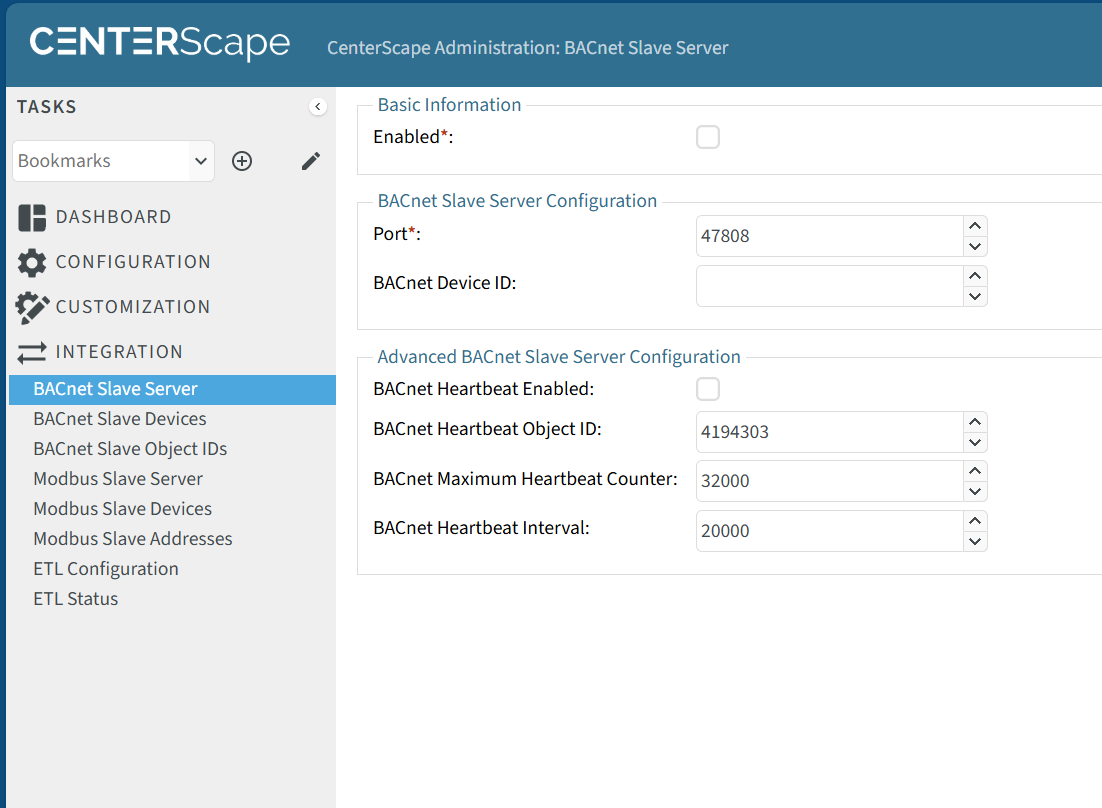
In the Admin Console Navigate to Integration->BACnet Slave Server. This will bring up the base configuration options for BACnet. To enable BACnet the Enabled check box must be checked. The default Port of 47808 is the standard port for BACnet, but other port numbers can be used if needed. BACnet Device ID is generally set to 1 unless there are many BACNet devices on the same subnet and a unique ID is needed for each device publishing BACnet data. The heartbeat function is available for applications that support BACnet heartbeat and enabled by the BACnet Heartbeat Enabled. BACnet heartbeats are optional and require software support from the consuming application. The BACnet specific address of the heartbeat can be set by the BACnet Heartbeat Object ID. The BACnet Maximum Heartbeat Counter how many seconds will be incremented on the counter until the counter rolls over back to zero. The BACnet Heartbeat Interval is set to 20 seconds by default as the interval is in milliseconds. The minimum is 3000 milliseconds and the maximum is 300000 milliseconds based on BACnet protocol specifications.
Publishing Sensor Points in BACnet
CenterScape can contain a practically unlimited number of sensors and points that can be published. Because of this there are no default sensor points published. BACnet can support any numerical attribute that are assigned to assets in CenterScape. For example, Temperature, Humidity, Differential Pressure and booleans like door open/closed can be published via BACnet. Strings like Detected Location, Sensor Name, and any other string type cannot be published via BACnet due to limitations in the underlying BACnet Protocol. Those attributes can be published via rest JSON/API, or SNMP bridge but not BACnet. Sensor points are publish based on filters that narrow the scope of the sensors published and by choosing which sensor attributes are to be published. Each of these filters are independent and one or many can be used to publish BACnet data. Depending on the filter and attributes chosen, a single data source may be published on multiple BACnet addresses.
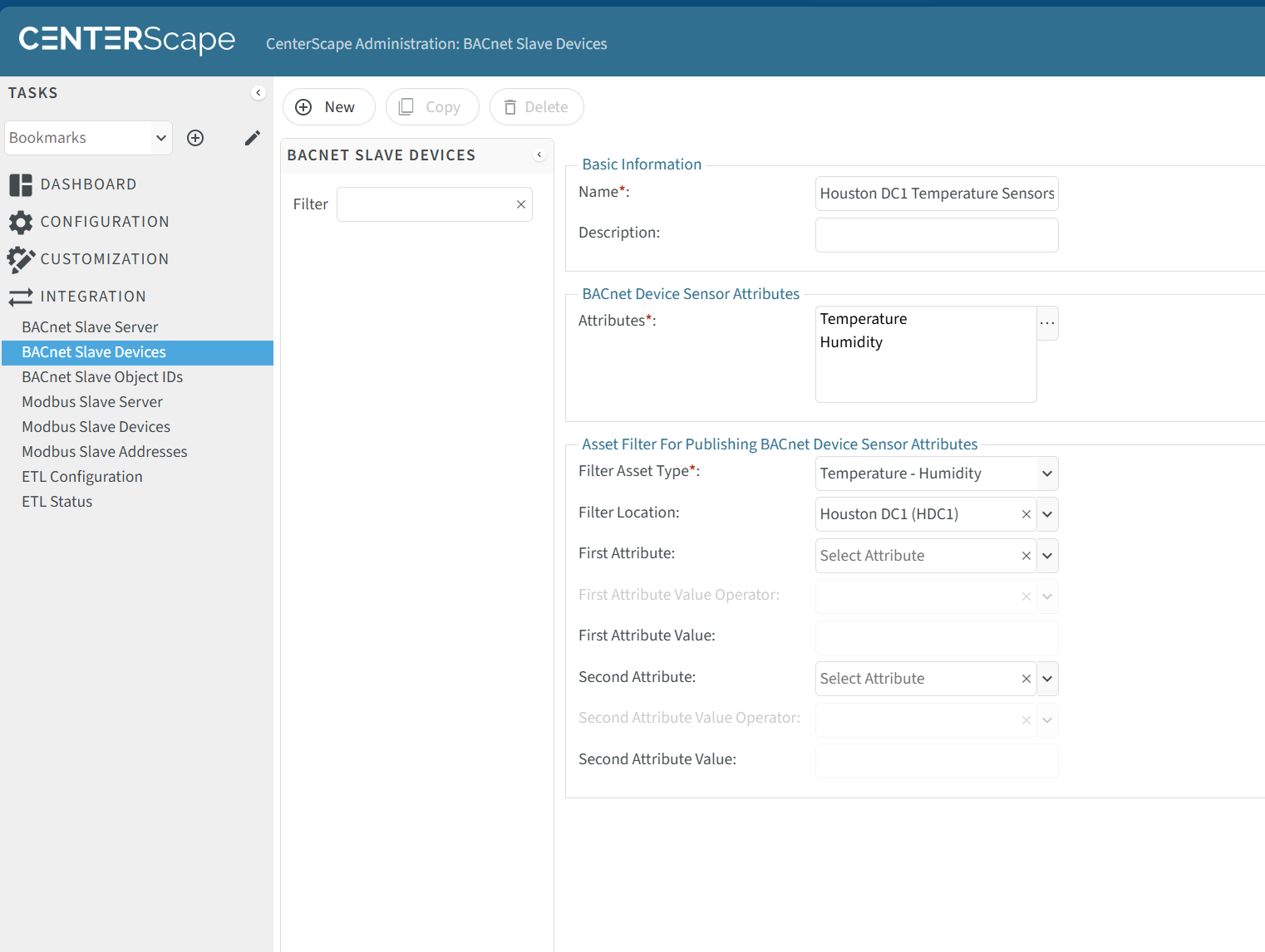
BACnet Collections can be managed at Integration->BACnet Slave Devices. The configuration below will publish Temperature and Humidity attributes of all the "Temperature - Humidity" sensors assigned to the Houston DC.
| Attribute Name | Description |
|---|---|
| Name | This is the name of the Slave Device collection. It must be unique in CenterScape and should be descriptive of what sensors the collection contains. |
| Description | This is an optional field that can be more descriptive of the nature of the collection. |
| Attributes | This is a list of attributes to publish for each sensor or summary asset that the filter matches. Attributes must exist on the sensor or summary asset that meets the filter. For example Temperature will be available on a Temperature-Humidity sensor but Average Temperature will not be available on that type. ALso, only numeric attributes (floats, boolaen, percent, etc) will be available to publish on BACnet. In the screen shot example Temperature and Humidity is selected. |
| Filter Asset Type | This limits the filter to match assets of a given type. Example would be Temperature - Humidty, Differential Pressure, or Rack if summary assets are used to publish calculated fields. There is no limit to the types that can be matched, but only numeric attributes can be published. |
| Filter Location | This contrains the Sensors in the collection to a specific assigned location. In the above example the Houston DC1 data center is chosen which limits the sensor colelction to that data center. Other collections can be created for other datacenters. This is optional and is used to organize BACnet Addressing. |
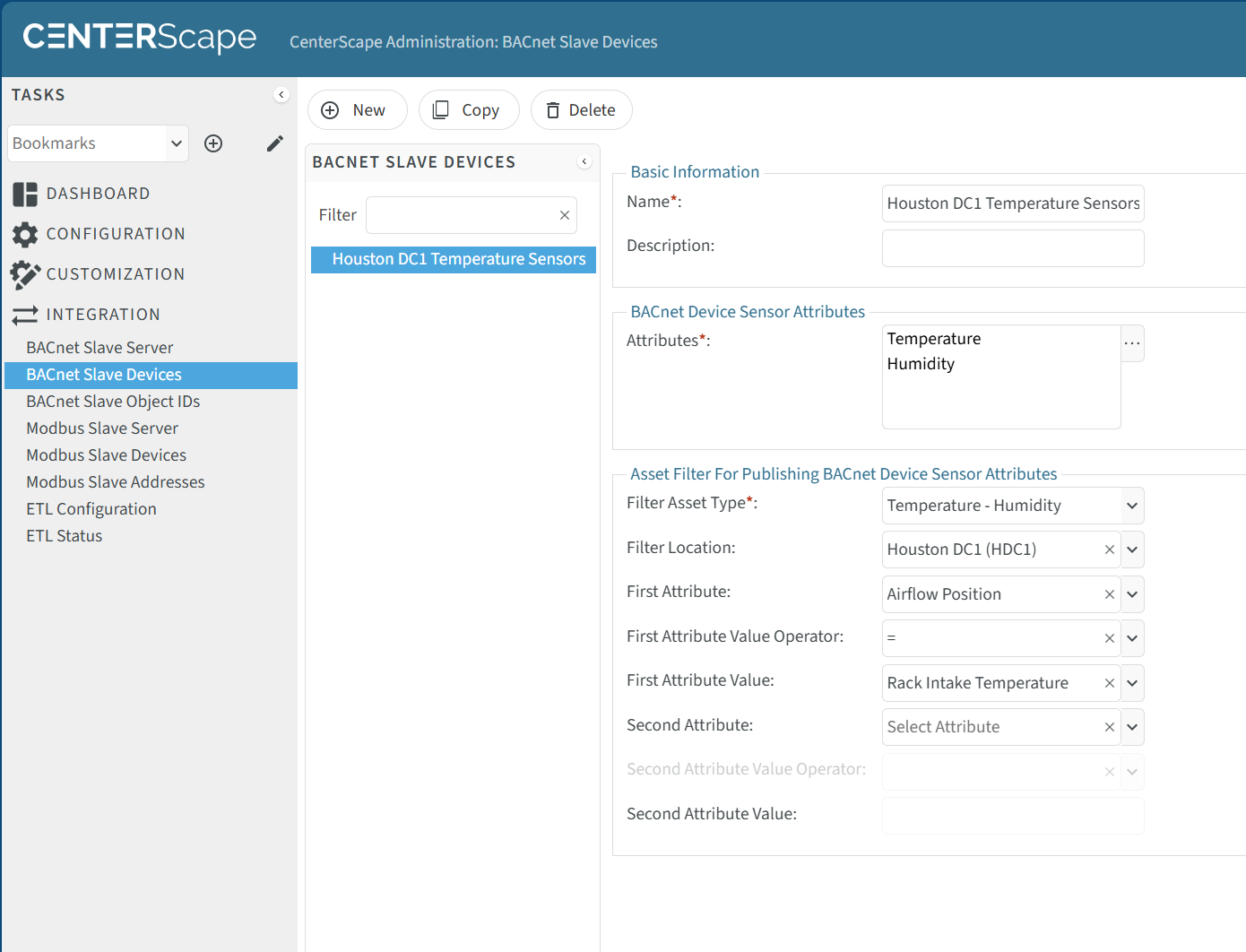
| Additional Attribute Filters | In addition to sensor type and location, two additional optional filter criteria based on attribute values can be added. This could be something like Airflow Position = Rack Intake Temperature. This would look something like the following screenshot. |
Once a collection is defined the BACnet Addresses become Immutable, meaning they will not change except in the following conditions:
- A new sensor is added or an existing attribute is changed that matches the collection filter. When this occurs new addresses will be assigned to the collection based on the next available address.
- A sensor that is in the collection exist the filter because it no longer matches the criteria. For example a Sensor that was in Houston DC1 is moved to another location that is not within Houston DC1. When this occurs the sensor is removed from the collection and its BACnet address becomes available for future assignment.
- The collection definition is modified. Modifying a collection, such as adding or removing an attribute filer or changing a location filter will re-enumerate all BACnet addresses and require a remapping of all sensors in the collection.
Accessing BACnet Addressing of Sensors
To view the addresses of BACnet Sensor Collections navigate to Integration->BACnet Slave Object IDs in the admin console. Select the collection instance from the middle window pane and the addresses will appear on the right hand side.
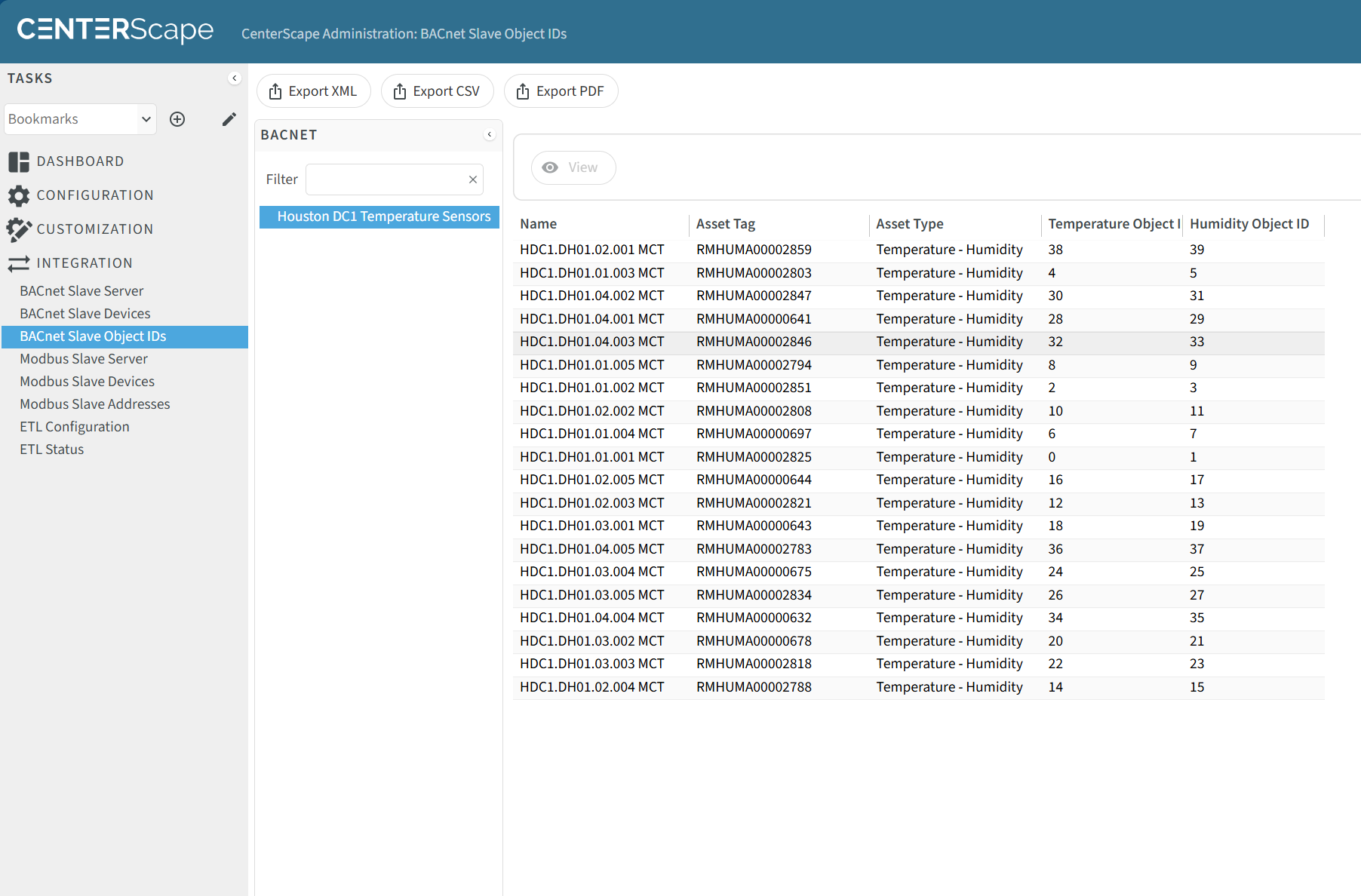
The Object ID columns for temperature and humidity display the BACnet address for each attribute type on the named sensor. To export this click on the Export XML, Export CSV, or Export PDF buttons on the top the page. An example of a csv export of BACnet addresses can be found HERE
This information is what is required to add BACnet addresses to points on a software that consumes BACnet data.