Creating Rules
After a location is created a rule or rules can be targeted at the location. Rules are used to calculate a tagged asset’s “detected location” by evaluating either SSI readers of a tag by readers or by mapping an IR Code that is configured to emit each location by A740 or A750 locators. There is no defined limit to the number of rules that a location can be targeted by and rules can be both IR and SSI based for a given location. Rules compete with other rules with each rule calculating a “confidence” number. The rule with the highest confidence number for a tag will have its targeted location become the detected location for a tag. Confidence is continuously calculated so all matching rules are always in the running to have their targeted detected location win out.
Simple SSI Rules
Simple SSI rules are the most general of rules. They are used to determine a detected location based on which reader or set of readers see a tag better than all other readers not included in the rule. Simple SSI rules generate confidence based on the most recent Single Best Tag Read from any Reader Channel that the rule is scoped to. Every 433Mhz RF Code tag or Sensor is compatible with Simple SSI Rules. When a reader or readers are installed in a room, that room is made a location and is targeted by a simple SSI Rule. For example, in the “Austin Data Center Room 1” there are two readers installed as shown below.
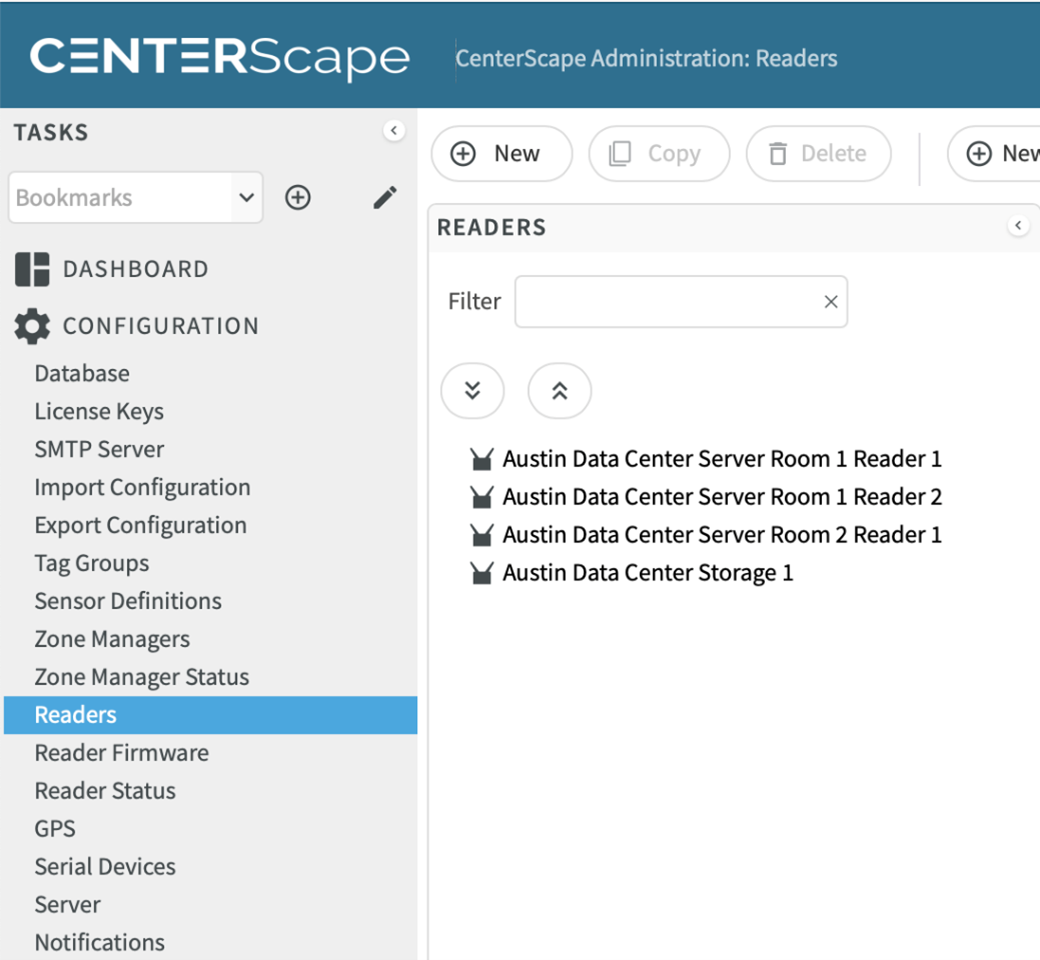
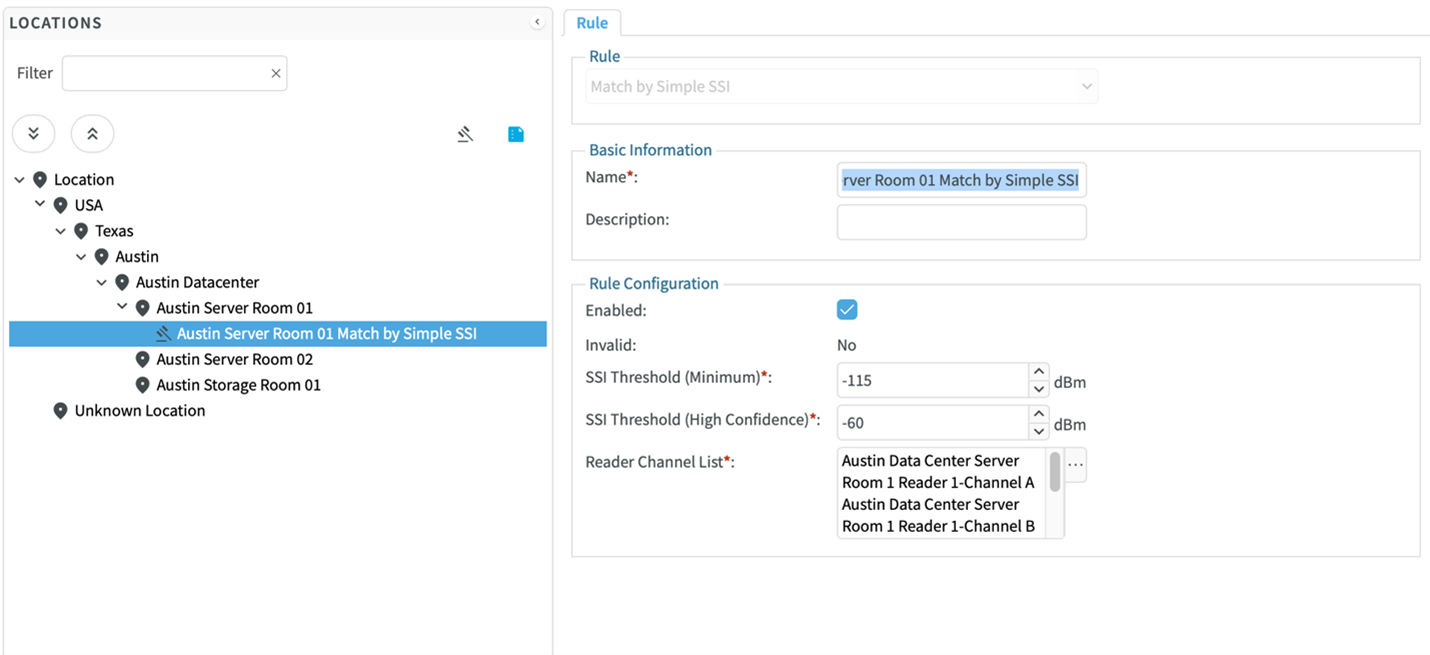
Right clicking on the Location and selecting “New Rule” or selecting “Austin Server Room 1” and clicking the New Rule button will bring up the Rule Creation Dialog. Selecting Match by Simple SSI will then bring up the options for the Simple SSI Rule.
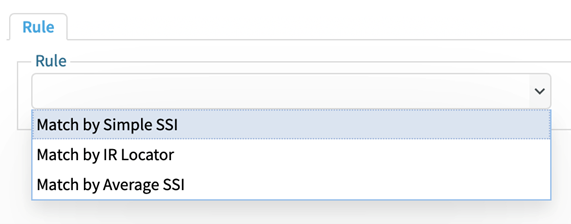
The name of the rule will automatically be pre-filled out as “[Location Name] + Match by Simple SSI”. The name of the rule must be globally unique in CenterScape so if a Simple SSI rule is already created for the location, the name will have to be altered on the second rule to make it unique. Names of SSI rules can be changed at any time. The description field is not required but can be used for notes about the rule. The enabled check box will enable the rule when checked or disable the rule when unchecked.
SSI minimum Threshold is the weakest signal strength a tag can be read at an considered for the rule. The default is -115 which is the weakest signal an M250 can process. SSI Threshold (High Confidence) is a signal strength level in which massive amounts of “confidence” are added to support the rule. For both SSI Thresholds it is not recommended that the default settings be changed especially if there are many SSI rules competing as there is a cascading effect where changes to one rule may affect the detection of other rules. In some circumstances such as when a reader has significantly less performance than its peers the SSI Threshold (High Confidence) can be lowered, but it is typically better to attempt to move the reader to a better location for better performance.
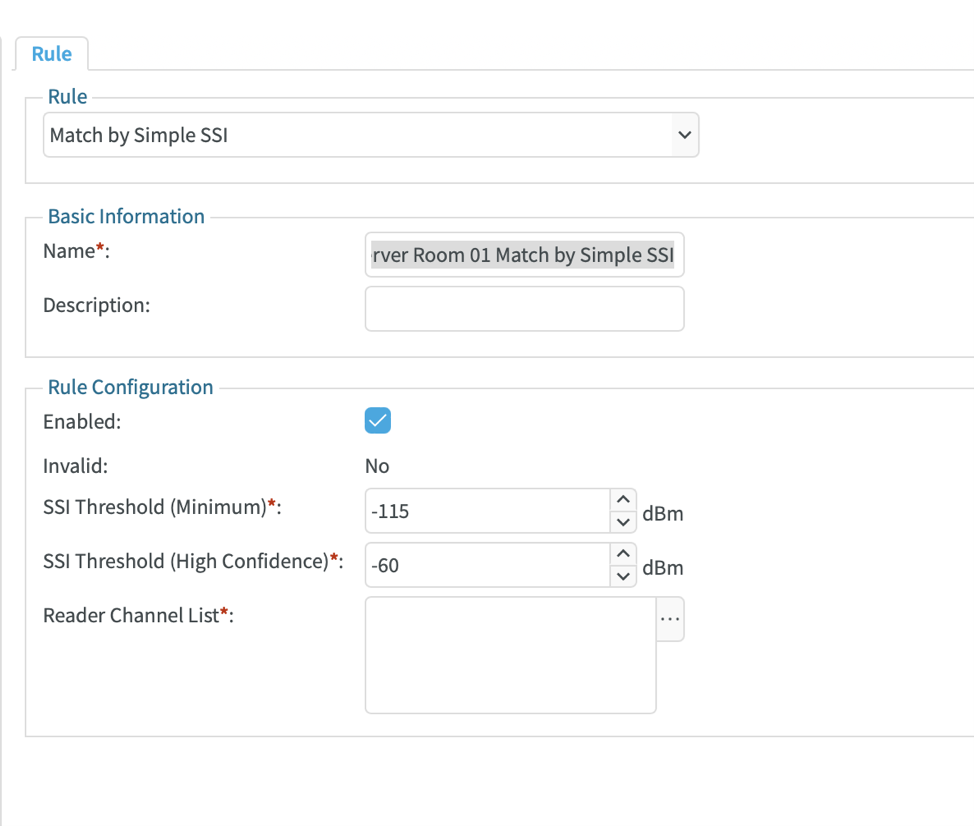
The reader Channel List field is a list of reader antennas that are scoped to an SSI Rule. Each simple SSI rule can have a maximum of 40 channels. In this case there are two readers in the Austin Data Center Server Room 1 so both readers are selected by holding the shift key and selecting both readers then clicking on the right arrow to move them from available reader channels to selected reader channels.
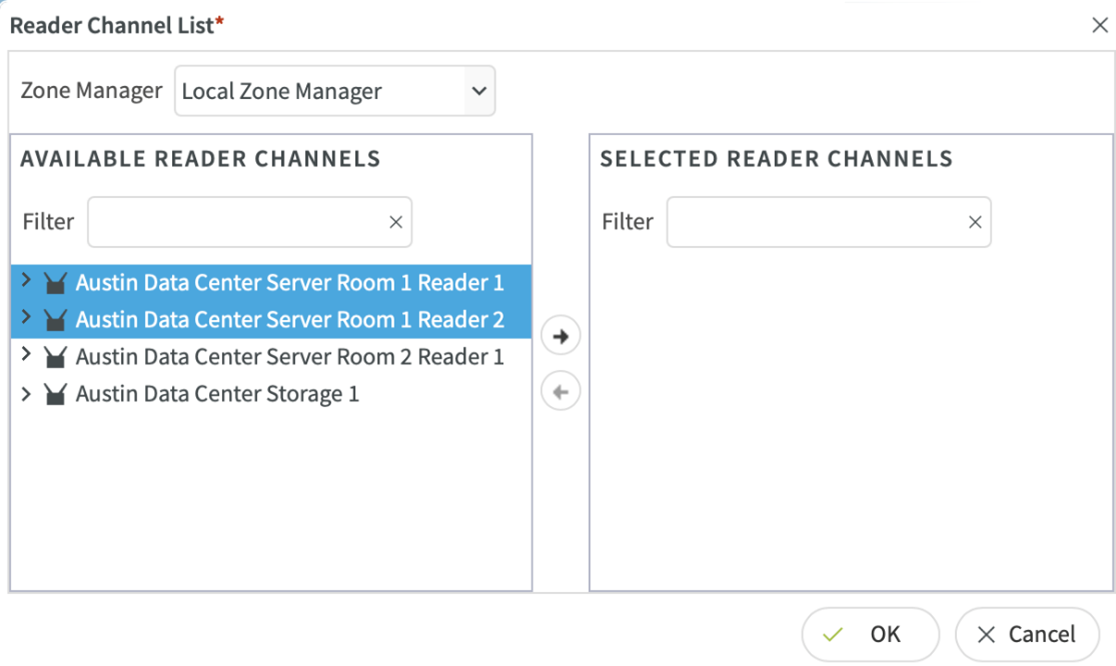
There are now four channels in the Selected Reader Channels list, one for each antenna on the two M250 readers. In some rare cases where cabled extensions are used, only one antenna on a reader can be chosen for a rule, but this is an infrequent configuration.

Note: For multiple zone managers a Zone Manager may be selected other than the default “Local Zone Manager”. The available reader channels will then be based on what readers are assigned to the zone manager selected. SSI rules should never have readers from two different Zone Managers.
Once the rule is created it will be listed as a child of the location with a gavel icon representing that it is a rule and not a location. Rules can be renamed, disabled, modified or deleted after they are created, though those changes may take a few minutes before the rules engine has a chance to reprocess confidence results.
Average SSI Rules
Average SSI Rules are like Simple SSI rules except that instead of confidence being generated by the best read of any reader in the channel list, the confidence is based on the average read of all reader channels. For this reason, average SSI rules should be limited to two and at most three readers. The field SSI Threshold (Per-Channel Minimum) is the synthetic value used for a reader in the channel list that does not see a tag seen by other readers in the list. Average SSI Rules are not generally used except to create a location zone that lays between two readers and has varying amounts of success in competition with other rules. Average SSI Rules are not recommended for use in datacenter applications, but can be used special cases in warehouses, industrial, or agricultural applications where location reliability of a sublocation is not required to be stable, but only assist with locating an asset in a large area.
IR Rules
IR Rules target a location based on an infrared broadcasted code that seen by and IR capable Asset Tag and relayed in its radio beacon. Only tags with IR sensors that can read Infrared emissions from A750 an A740 locators will be able to use IR rules. Each IR code used should be unique per Zone Manager instance and is a four character string between 0001 and 9999. Leading zeros must be used as “1” is not the same as “0001” due to compatibility required from an older IR technology. When an IR Rule matches, the confidence generated by the rule is 1.00. This is higher than any SSI can be, so the IR rule will always trump any SSI Rules that may also match. The theory is that line of site is more reliable and precise than RF signal strength.
Note: It is not recommended that IR Code 0001 ever be used in production since that is the default code that locators ship with. A device that was not programed will map to an existing cabinet or room and it will be confusing.
A750 Room Locators are non-networked devices that are designed to emit infrared signals over room sized areas. A740 Rack Locators are non-networked devices designed to emit infrared signals very short distances in server cabinets. For each A740 a unique IR Code must be configured using the A740 configuration utility. A750 devices can share a single code if a broader coverage area is desired, but a room should have only a single A750 IR code. The configuration utility for a room locator is more complex with additional options documented in the A750 user guide. A750 and A740 devices should never be used in the same room as they will interfere with each other. SSI Rules and IR Rules can and should be used together in rooms with A750 Room locators and M250 Readers. IR Rules for A740 Rack Locators should not be used at the room level but rather at sublocations created specifically for racks.
In the below example the storage room “Austin Storage Room 1” there is an A750 Room Locator with an IR Code of 4000. To create a IR Rule for this location select the room and right click New Rule. Select Match by IR Locator from the rule drop down list.

The IR Rules name must be unique and will default to “[Location Name] + Match by IR Locator”. The description is optional and can be used to describe the placement of the locator or locators with the common IR code if using multiple A750 Room Locators in team mode. For Matching IR Locator enter four numeric characters between 0002 and 9999 that matches the code programed on the locator physically installed for the location. By default, the Zone Manager field is not selected. This means that the IR Rule will be active across all Zone Manager instances. This setting is fine for most installations with less than 10,000 locations. IR Locator Timeout is the number of seconds that a tag can report “0000” which means no IR found before the IR Rule no longer contributes confidence. Essentially this means that if an asset is removed from a cabinet or room then the timeout must expire before the tag’s detected location changes. Reader Channel List should be used sparingly. When left blank a tag read by any reader with a matching IR Locator Code will trigger the rule, but if any readers are added to the reader channel list, then the IR Rule will ignore tags reads with matching IR Codes from any reader not on the reader channel list. Reader channel lists can be used if duplicate IR codes are used on a single Zone Manager but are not in close enough proximity to be seen by the same readers. Locator’s Reference tag is a specialized function for A750 Room Locators that are custom shipped with a special asset tag. Ignore Location Update Delay bypasses the location update delay configured as part of the tag group settings and immediately locates the tag to the target location when IR matches. It also will trump the IR Locator timeout of another rule so that a tag seen by another matching IR Rule will immediately exit the previous detected locations without waiting to the IR Locator Timeout to expire.
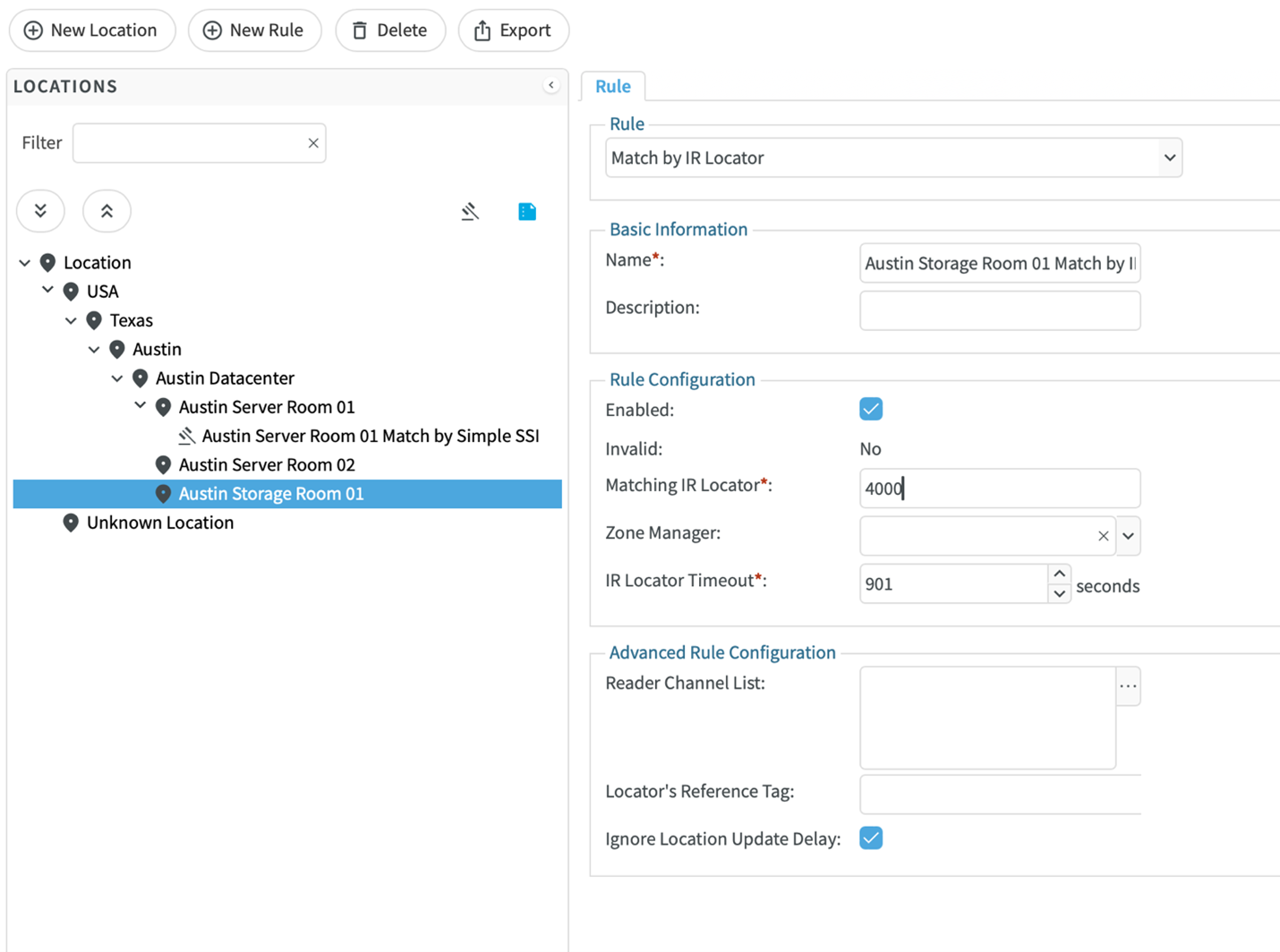
The default settings of IR Locator Timeout being set to 901 and Ignore Location Update Delay being set to true are designed for best practices for rack level asset tracking in the datacenter. It is recommended that these setting be maintained in that use case, but other use cases such as pallet or people tracking may be better with different settings.